System - It is sad to note that an increasing number of Sinclairists are switching to other platforms, mainly to IBM.
30 June 1997
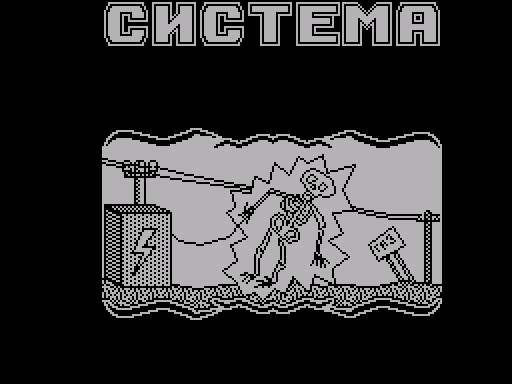 As sad as it is to note, everything is
More Sinclairists are switching to
other platforms, mainly on IBM.
We decided to help make the transition to
that light (i.e. IBM's light) was less
painful. Today we will tell you how
especially without overworking your hands
(if they grow from there) yourself
build a computer like an IBM PC (read:
ibm pisi, in the word pisi the emphasis is on
the second syllable, not the first). So, let's start
1.MOTHERBOARD.
Already from the name it is clear what it is and with
what they eat it (and how to get it). You
go up to your mother and say the phrase
memory like "Trick or Treat". If you don't
I like this way of putting the phrase, you can
get by with a phrase like “Give me some pocket money.”
expenses, I give my word that if I buy vodka,
then I’ll share." Obtained in this way
money can be considered payment for your
persistence in getting this money. But you
do not waste, but use directly
intended purpose - as a motherboard.
2. SYSTEM UNIT.
No one really knows what it is, but
many people stubbornly believe that this is a box,
which houses the motherboard
(see above), hard drive (see below) and others
disgusting. In this case, you can do
you just need to find a box, preferably
large sizes, drill or cut outpour holes in it for all devices (see.
above and below) and you have a system unit
ready.
Z.WINCHESTER.
An integral part of any computer -
Winchester or as it is also called, screw.
The last circumstance leads to
which is perplexing - what exactly, screw
or hard drive? (Let me explain that the screw-thread-
a connection that looks like a bolt,
and a Winchester is a firearm.)Pro-
The problem can be solved quite simply - just take it
hard drive (weapon) and unscrew it from
screw it (threaded connection) and here it is
This is how you get a screw from a hard drive.
4.MONITOR.
What does this thing do on the computer?
everyone knows. The monitor is always something
shows (unless, of course, it is disabled).
That's why you take an ordinary TV
and calmly use it as a monitor
(especially since most Sinclairists
that's exactly what it does).
5.DISK DRIVE.
If you still have a disk drive from Spect-
room, you can safely use it
Well, if not, then the disk drive is made for sure
as well as CD-ROM (see below).
6.KEYBOARD.
And you can also take it from the Spectrum, well
if it doesn't work out, you can always take it
keyboard from a typewriter or, on
the worst ending, from the calculator (especially
on some calculators there are buttons
even more than on a computer).
7.MOUSE.
I hope you understand what I'm talking about and
like withact on it. On my own behalf I will add that
be careful about mice, don't confuse them
with rats and bat mice, as this
could end badly for you.
Well, here is the initial configuration of the com-
pewter is assembled, but this is usually
is small, and therefore the computer is equipped
so-called multimedia (a mixture
cartoons and medicine). Let's explain how
do that too.
8.CD-ROM.
Like the disk drive (see above), this thing is harmful
spares the disks. To achieve this effect
you can do it in three ways:
1) Place the discs in the microwave,
where they will quietly rotate.
Disadvantage: slow rotation speed.
2) Ask a juggler you know to
rotated the disk.
Disadvantage: it’s not always possible to find
a familiar juggler.
H) The easiest way is to find a gramophone,
who can satisfy you in all
directions. (How? - editor's note)
9.SOUND BLASTER.
Our knowledge of English speaks
that SOUND is sound, and BLASTER is different
visibility of beam weapons (see film
"Star Wars" - not to be confused with "Star Wars"
heritage"). So everything is simple here.
Take a blaster (if you have it somewhere) and auto-
STRENGTHEN THE PROCESS OF GETTING SOUND FROM
him, i.e. in the special case of a shot.
SOUND from this BLASTER will be what you are looking for
thing.
10.PRINTER.
It is known for certain about the printer that it
buzzes and spoils the paper with all sorts ofinscriptions
Therefore, to get it, take a pair
dozens of bees (live), paint them
(if you want to have a Color printer, then
paint with different colors) and place in
small cartridge (we think the cartridge
from Super Nintendo will do). Received
the printer will exceed all your expectations!!!
11.FAX MODEM.
And it's a no brainer that this thing consists of
two - a fax and a modem. What is a fax,
you can guess by remembering English
(in English the fax will probably be FUCKS, i.e.
e. plural of the word fak).C
modem is somewhat more complicated. It is known that
it connects to the network and something pre-
forms. So just use
a telephone whose operation is similar to that of
modem. After that, connecting the fax and modem
you will receive a fax modem.
As sad as it is to note, everything is
More Sinclairists are switching to
other platforms, mainly on IBM.
We decided to help make the transition to
that light (i.e. IBM's light) was less
painful. Today we will tell you how
especially without overworking your hands
(if they grow from there) yourself
build a computer like an IBM PC (read:
ibm pisi, in the word pisi the emphasis is on
the second syllable, not the first). So, let's start
1.MOTHERBOARD.
Already from the name it is clear what it is and with
what they eat it (and how to get it). You
go up to your mother and say the phrase
memory like "Trick or Treat". If you don't
I like this way of putting the phrase, you can
get by with a phrase like “Give me some pocket money.”
expenses, I give my word that if I buy vodka,
then I’ll share." Obtained in this way
money can be considered payment for your
persistence in getting this money. But you
do not waste, but use directly
intended purpose - as a motherboard.
2. SYSTEM UNIT.
No one really knows what it is, but
many people stubbornly believe that this is a box,
which houses the motherboard
(see above), hard drive (see below) and others
disgusting. In this case, you can do
you just need to find a box, preferably
large sizes, drill or cut outpour holes in it for all devices (see.
above and below) and you have a system unit
ready.
Z.WINCHESTER.
An integral part of any computer -
Winchester or as it is also called, screw.
The last circumstance leads to
which is perplexing - what exactly, screw
or hard drive? (Let me explain that the screw-thread-
a connection that looks like a bolt,
and a Winchester is a firearm.)Pro-
The problem can be solved quite simply - just take it
hard drive (weapon) and unscrew it from
screw it (threaded connection) and here it is
This is how you get a screw from a hard drive.
4.MONITOR.
What does this thing do on the computer?
everyone knows. The monitor is always something
shows (unless, of course, it is disabled).
That's why you take an ordinary TV
and calmly use it as a monitor
(especially since most Sinclairists
that's exactly what it does).
5.DISK DRIVE.
If you still have a disk drive from Spect-
room, you can safely use it
Well, if not, then the disk drive is made for sure
as well as CD-ROM (see below).
6.KEYBOARD.
And you can also take it from the Spectrum, well
if it doesn't work out, you can always take it
keyboard from a typewriter or, on
the worst ending, from the calculator (especially
on some calculators there are buttons
even more than on a computer).
7.MOUSE.
I hope you understand what I'm talking about and
like withact on it. On my own behalf I will add that
be careful about mice, don't confuse them
with rats and bat mice, as this
could end badly for you.
Well, here is the initial configuration of the com-
pewter is assembled, but this is usually
is small, and therefore the computer is equipped
so-called multimedia (a mixture
cartoons and medicine). Let's explain how
do that too.
8.CD-ROM.
Like the disk drive (see above), this thing is harmful
spares the disks. To achieve this effect
you can do it in three ways:
1) Place the discs in the microwave,
where they will quietly rotate.
Disadvantage: slow rotation speed.
2) Ask a juggler you know to
rotated the disk.
Disadvantage: it’s not always possible to find
a familiar juggler.
H) The easiest way is to find a gramophone,
who can satisfy you in all
directions. (How? - editor's note)
9.SOUND BLASTER.
Our knowledge of English speaks
that SOUND is sound, and BLASTER is different
visibility of beam weapons (see film
"Star Wars" - not to be confused with "Star Wars"
heritage"). So everything is simple here.
Take a blaster (if you have it somewhere) and auto-
STRENGTHEN THE PROCESS OF GETTING SOUND FROM
him, i.e. in the special case of a shot.
SOUND from this BLASTER will be what you are looking for
thing.
10.PRINTER.
It is known for certain about the printer that it
buzzes and spoils the paper with all sorts ofinscriptions
Therefore, to get it, take a pair
dozens of bees (live), paint them
(if you want to have a Color printer, then
paint with different colors) and place in
small cartridge (we think the cartridge
from Super Nintendo will do). Received
the printer will exceed all your expectations!!!
11.FAX MODEM.
And it's a no brainer that this thing consists of
two - a fax and a modem. What is a fax,
you can guess by remembering English
(in English the fax will probably be FUCKS, i.e.
e. plural of the word fak).C
modem is somewhat more complicated. It is known that
it connects to the network and something pre-
forms. So just use
a telephone whose operation is similar to that of
modem. After that, connecting the fax and modem
you will receive a fax modem.
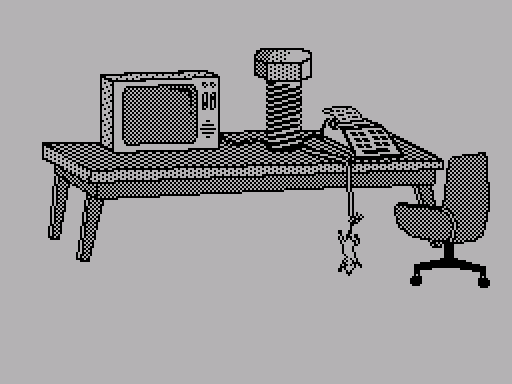 Well, you’ve assembled a computer. But this too...
it's not enough. Sometimes a problem arises
- how to connect computers to a network. All on
in fact, simply from the wires with which
you combined all of the above (and
If you haven’t connected, then connect - it’s useful -
tsya) weave a network, and now you have it ready
NETWORK COMPUTER!
Well, you’ve assembled a computer. But this too...
it's not enough. Sometimes a problem arises
- how to connect computers to a network. All on
in fact, simply from the wires with which
you combined all of the above (and
If you haven’t connected, then connect - it’s useful -
tsya) weave a network, and now you have it ready
NETWORK COMPUTER!

Share your thoughts about the article